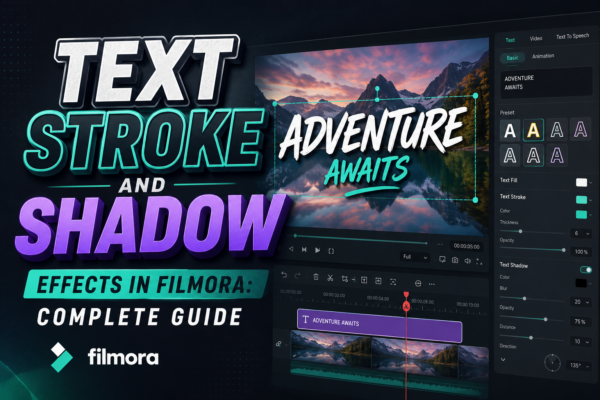
In modern video editing, text is no longer just information—it’s a visual storytelling tool. Whether you’re creating YouTube videos, social media reels, or business promos, the way your text looks can completely change how viewers perceive your content.
One of the most powerful ways to elevate your text design is by using stroke and shadow effects. These effects help your titles stand out, improve readability, and add a cinematic feel to your videos.
In this guide, you’ll learn everything about text stroke and shadow effects in Filmora, https://filmora.wondershare.com/including how to use them, when to apply them, and professional design tips to make your videos look polished and engaging.
Quick Answer
Text stroke and shadow effects in Filmora are styling tools that enhance text visibility and depth. Stroke adds an outline around text, while shadow creates a soft or sharp depth effect behind it. Together, they improve readability and make titles stand out in videos, especially against complex backgrounds.
What Are Text Stroke and Shadow Effects in Filmora?
In Filmora, text effects are part of the built-in title customization tools that help editors enhance typography visually.
1. Text Stroke (Outline Effect)
Text stroke refers to a colored border around your text. It is used to:
- Improve visibility against busy backgrounds
- Add contrast and emphasis
- Create bold, attention-grabbing titles
2. Text Shadow Effect
Text shadow adds a blurred or solid shadow behind your text. It is used to:
- Create depth and dimension
- Make text appear floating above the video
- Improve readability in bright or complex scenes
Together, these effects transform flat text into professional-looking titles.
Why Use Stroke and Shadow in Video Editing?
Using text styling is not just about aesthetics—it’s about communication clarity.
Key Benefits:
- Better readability in fast-moving scenes
- Professional appearance for branding and storytelling
- Stronger visual hierarchy (important words stand out)
- Improved engagement on YouTube and social media
Real-world Example:
Imagine a travel vlog showing a bright beach scene. Without stroke or shadow, white text disappears in sunlight. But with a black stroke and soft shadow, the title becomes clear and visually appealing.
How to Add Text Stroke in Filmora (Step-by-Step)
Here’s a simple workflow used by video editors:
1: Add Text
- Open Filmora
- Go to Titles
- Drag a text preset to the timeline
2: Open Editing Panel
- Double-click the text layer
- Go to Advanced Edit / Text Settings
3: Enable Stroke
- Find “Border” or “Stroke” option
- Turn it ON
- Choose:
- Color (black or white works best)
- Thickness (1–5 depending on style)
4: Adjust Visibility
- Test against background
- Increase thickness if needed
How to Add Shadow Effect in Filmora
Shadow adds realism and depth to your text.
Select Text Layer
Click your text in the timeline
Enable Shadow Option
In text settings:
- Turn on Shadow
Customize Shadow
Adjust:
- Opacity (soft or strong)
- Blur (smooth vs sharp look)
- Distance (how far shadow falls)
- Angle (direction of light)
Pro Tip:
Use subtle shadows for professional videos and stronger shadows for dramatic effects like gaming or cinematic intros.
Stroke vs Shadow: What’s the Difference?
| Feature | Stroke | Shadow |
|---|---|---|
| Purpose | Outlines text | Adds depth |
| Visibility | High contrast | Soft enhancement |
| Style | Bold & graphic | Cinematic & natural |
| Best use | Titles, thumbnails | Subtitles, intros |
Both effects work best when combined carefully.
Best Use Cases of Stroke and Shadow Effects
1. YouTube Thumbnails & Titles
- Bold stroke improves visibility
- Shadow adds professional touch
2. Social Media Reels
- Makes captions readable on mobile screens
3. Business Presentations
- Enhances brand credibility
4. Gaming Videos
- Strong strokes create energetic visuals
5. Educational Content
- Improves clarity of on-screen instructions
Pro Tips for Professional Text Design
Here are expert-level strategies used by video editors:
1. Don’t Overuse Effects
Too much stroke or shadow can make text look cluttered.
2. Match Background Contrast
- Light background → dark stroke
- Dark background → light stroke
3. Use Consistent Styling
Keep the same stroke/shadow style throughout a video for branding consistency.
4. Combine with Fonts Wisely
- Bold fonts = minimal stroke
- Thin fonts = stronger stroke
5. Keep Mobile View in Mind
Most viewers watch on phones—ensure readability at small sizes.
Common Mistakes to Avoid
- Using too many shadow layers
- Choosing colors that blend with background
- Making stroke too thick
- Using inconsistent text styles
- Ignoring readability on mobile screens
Avoiding these mistakes instantly improves video quality.
Advanced Design Insight (EEAT Perspective)
Professional editors treat text as part of the visual composition—not just labels.
Experts recommend:
- Using stroke for clarity first
- Using shadow for depth second
- Keeping effects subtle for corporate content
- Increasing intensity for entertainment content
This balance ensures your videos remain both attractive and professional.
Comparison: Minimal vs Enhanced Text Styling
Minimal Style
- No stroke or soft shadow
- Clean and modern look
- Best for corporate videos
Enhanced Style
- Stroke + shadow combined
- High visibility
- Best for YouTube, ads, and promos
Choosing the right style depends on your audience and platform.
FAQ: Text Stroke and Shadow Effects in Filmora
1. What is text stroke in Filmora?
Text stroke is an outline added around text to improve visibility and make it stand out from the background.
2. What is the purpose of shadow effect?
Shadow adds depth behind text, making it look more realistic and visually separated from the background.
3. Can I use stroke and shadow together in Filmora?
Yes, combining both effects is common and recommended for professional-looking titles.
4. Do stroke and shadow affect video performance?
No, they are lightweight effects and do not significantly impact rendering performance.
5. What is the best stroke color for text?
Black or white are most commonly used because they provide the highest contrast in most video scenes.
Conclusion: Make Your Text Stand Out Like a Pro
Mastering text stroke and shadow effects in Filmora is one of the simplest yet most powerful ways to improve your video quality. These effects help you create clear, readable, and visually appealing titles that grab attention instantly.
Whether you’re editing YouTube videos, marketing content, or social media clips, using stroke and shadow strategically can transform your storytelling.
If you want professional results, focus on balance—keep effects subtle, readable, and consistent.
Call to Action
Start experimenting with stroke and shadow effects in your next Filmora project and observe how dramatically your video quality improves.











