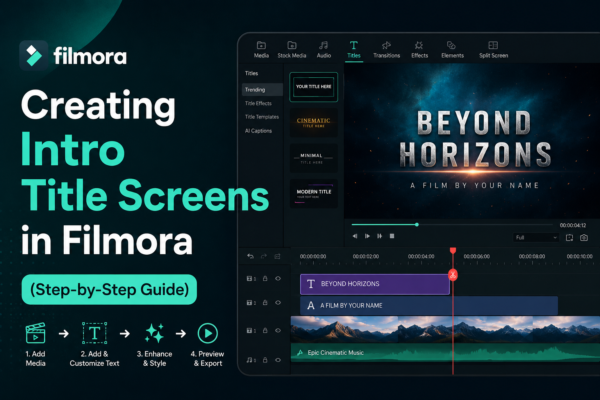
Have you ever watched a YouTube video or a short film where the opening title instantly grabs your attention? That polished intro screen is not just decoration—it sets the tone, builds branding, and keeps viewers engaged.
In video editing, especially for creators using Filmora, learning creating intro title screens in Filmora is one of the most important skills for making professional-looking content. Whether you’re a YouTuber, marketer, or beginner editor, a strong intro can dramatically improve how your videos are perceived. You can read our complete guide to understad Filmora https://youtubevideoeditingservices.com/what-is-filmora-video-editing-guide/
In this guide, you’ll learn everything from basic setup to advanced styling techniques so you can design cinematic, eye-catching intro title screens with confidence.
Quick Answer
Creating intro title screens in Filmora involves selecting a title template, customizing text, adding animations, adjusting timing, and enhancing visuals with effects. Users can use Filmora’s built-in title library, drag-and-drop features, and motion effects to create professional intro screens for YouTube, business videos, or films in just a few minutes.
What Are Intro Title Screens in Filmora?
Intro title screens are the opening visuals of a video that typically display:
- Video or channel name
- Logo or branding
- Catchy animations or motion graphics
- Background music or sound effects
In Filmora video editing software, these intro screens are created using built-in title templates, motion graphics, and text animation tools.
Why they matter:
- Build first impressions within 3–5 seconds
- Strengthen brand identity
- Improve audience retention
- Make content look professional
Step-by-Step Guide to Creating Intro Title Screens in Filmora
Here is a practical workflow for creating intro title screens in Filmora like a professional editor:
Step 1 – Import Your Media
Start by launching Filmora and importing:
- Background video or image
- Logo file (PNG recommended)
- Audio or background music
Drag them into the timeline to begin editing.
Step 2 – Choose a Title Template
Filmora offers a wide range of title presets and motion graphics templates.
To access:
- Go to the “Titles” tab
- Browse categories like Intro, Lower Thirds, or Openers
- Drag your chosen template to the timeline
👉 Pro Tip: Choose templates that match your video tone (corporate, cinematic, vlog, etc.)
Step 3 – Customize Text Content
Now edit the default text:
- Replace placeholder text with your brand name
- Adjust font style (modern, bold, elegant)
- Change color to match branding
This is a key step in creating intro title screens in Filmora that feel personalized.
Step 4 – Add Animation Effects
Filmora allows you to animate text using:
- Fade in / fade out
- Zoom effects
- Slide transitions
- Bounce or glitch effects
These animations help your intro feel dynamic and engaging.
Step 5 – Adjust Timing and Sync
Timing is crucial:
- Keep intro duration between 3–7 seconds
- Sync text with background music beats
- Ensure smooth transitions into main content
Poor timing can make even a good design feel unprofessional.
Step 6 – Add Music and Sound Effects
Audio enhances emotional impact.
Use:
- Cinematic intro music
- Soft whoosh effects
- Branding sound logo (optional)
Make sure audio is not too loud compared to voiceover or main content.
Step 7 – Export Your Video
Once satisfied:
- Click “Export”
- Choose resolution (1080p or 4K recommended)
- Select MP4 format for compatibility
Your intro title screen is now ready to use.
Best Practices for Creating Intro Title Screens in Filmora
To master creating intro title screens in Filmora, follow these expert tips:
✔ Keep it short
Long intros reduce viewer retention.
✔ Use consistent branding
Fonts, colors, and logos should match your channel identity.
✔ Avoid over-animation
Too many effects can look distracting.
✔ Use high-quality assets
Blurry logos or low-res images reduce professionalism.
✔ Maintain visual hierarchy
Make your title readable even on mobile screens.
Use Cases of Intro Title Screens
Intro title screens created in Filmora are widely used in:
- 🎬 YouTube videos
- 📢 Business presentations
- 🎓 Educational tutorials
- 🎮 Gaming content intros
- 📱 Social media reels
Each use case requires different design styles—minimal for business, flashy for entertainment.
Pros and Cons of Using Filmora for Intro Titles
✔ Pros:
- Beginner-friendly interface
- Drag-and-drop templates
- Built-in animation presets
- Fast rendering speed
- Affordable compared to advanced tools
❌ Cons:
- Limited advanced motion graphics control
- Some premium templates require paid version
- Less flexibility than After Effects
Despite limitations, Filmora is still one of the best tools for beginners learning creating intro title screens in Filmora.
Filmora vs Other Editing Tools (Quick Comparison)
| Feature | Filmora | After Effects | CapCut |
|---|---|---|---|
| Ease of Use | ⭐⭐⭐⭐⭐ | ⭐⭐ | ⭐⭐⭐⭐ |
| Templates | High | Medium | High |
| Professional Control | Medium | Very High | Low |
| Beginner Friendly | Yes | No | Yes |
Filmora strikes a balance between simplicity and creativity, making it ideal for beginners and semi-professionals.
FAQs – Creating Intro Title Screens in Filmora
1. What is the best duration for an intro title screen?
The ideal duration is 3–7 seconds to keep viewers engaged without losing attention.
2. Can I create animated intro titles in Filmora?
Yes, Filmora provides built-in animation presets like fade, zoom, and slide for title screens.
3. Do I need premium Filmora for intro titles?
No, many free templates are available, but premium versions offer more advanced designs.
4. How do I make my intro look professional?
Use consistent branding, clean fonts, minimal animation, and high-quality audio.
5. Is Filmora good for YouTube intros?
Yes, Filmora is widely used by YouTubers because it is simple, fast, and beginner-friendly.
Conclusion
Mastering creating intro title screens in Filmora is one of the easiest ways to elevate your video content from basic to professional. A well-designed intro builds trust, strengthens branding, and improves viewer engagement instantly.
By using Filmora’s templates, animations, and customization tools, even beginners can create cinematic-quality intros in minutes.
If you’re serious about video creation, start experimenting with different styles today—your intro is the first impression your audience will remember.











