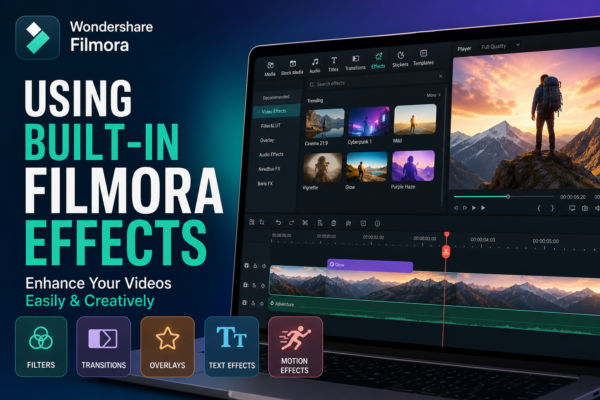
Video content is everywhere—YouTube, TikTok, Instagram Reels—and the competition for attention is tougher than ever. What makes a video stand out is not just the story, but the visual experience. This is where built-in Filmora Effects editing tools become powerful.
One of the most beginner-friendly yet powerful editing platforms is Filmora. It comes packed with ready-to-use effects that help creators transform ordinary footage into cinematic content without needing advanced editing skills.
In this guide, you’ll learn Using Built-in Filmora Effects https://filmora.wondershare.com/ in a practical, step-by-step way—so you can create polished, engaging videos even if you’re just starting out.
Quick Answer
Built-in Filmora effects are pre-designed visual enhancements such as filters, transitions, overlays, and motion elements inside Filmora video editing software. You can apply them by dragging and dropping onto your timeline, then customizing intensity, duration, or style. These effects help improve video quality quickly without advanced editing skills.
What Are Built-in Filmora Effects?
Built-in Filmora effects are preloaded creative tools inside the Filmora editor that help enhance videos instantly. Instead of manually designing animations or color grading from scratch, users can simply apply effects with one click.
Common Built-in Effects Include:
- Video filters (cinematic, vintage, cinematic tones)
- Transitions (fade, zoom, glitch, swipe)
- Motion effects (pan, zoom, shake)
- Text animations
- Audio visual effects
- Overlay elements (light leaks, dust, flares)
These tools make Using Built-in Filmora Effects fast, efficient, and beginner-friendly.
Why Built-in Filmora Effects Matter in Video Editing
Modern audiences expect visually appealing content. Even a good story can feel boring without proper editing.
Key Benefits:
- Saves editing time
- No need for third-party plugins
- Beginner-friendly interface
- Professional-quality results
- Consistent visual branding
Whether you’re editing YouTube videos, business ads, or social media clips, Using Built-in Filmora Effects can dramatically improve your output.
How to Use Built-in Filmora Effects (Step-by-Step Guide)
Here is a simple workflow to help you master Using Built-in Filmora Effects effectively:
1: Import Your Media
- Open Filmora
- Click “Import Media”
- Drag your video clips into the timeline
2: Access Effects Panel
- Navigate to the “Effects” tab
- Browse categories like filters, transitions, or overlays
3: Apply Effects
- Drag and drop an effect onto your clip
- Adjust duration and intensity
4: Preview and Fine-Tune
- Use the preview window
- Modify brightness, speed, or blending if needed
5: Export Your Video
- Choose resolution (1080p or 4K recommended)
- Export in MP4 format
This workflow ensures smooth Using Built-in Filmora Effects for any project.
Types of Built-in Filmora Effects Explained
1. Video Filters
Filters change the mood of your video instantly.
Examples:
- Cinematic tones
- Black & white styles
- Warm vintage look
👉 Best for storytelling and emotional content.
2. Transitions
Transitions control how one clip moves to another.
Popular types:
- Fade in/out
- Zoom transition
- Glitch effect
- Slide motion
👉 Great for YouTube vlogs and reels.
3. Motion Effects
Motion effects add movement to static clips.
Use cases:
- Zoom in for emphasis
- Shake for action scenes
- Slow pan for cinematic feel
4. Text Effects
Text animations help highlight messages.
Examples:
- Lower thirds
- Title animations
- Subtitle styles
5. Overlay Effects
Overlays add texture and depth.
Examples:
- Light leaks
- Dust particles
- Film grain
Pro Tips for Using Built-in Filmora Effects Like a Pro
If you want your editing to stand out, follow these expert strategies:
✔ Don’t Overuse Effects
Too many effects can make videos look unprofessional.
✔ Match Effects with Mood
- Emotional video → soft filters
- Action video → fast transitions
✔ Keep Consistency
Use the same style across all clips for branding.
✔ Combine Effects Smartly
Example:
Filter + subtle motion + text animation = professional result
Use Cases of Built-in Filmora Effects
1. YouTube Content Creation
Creators use effects to make intros more engaging and retain viewers.
2. Social Media Videos
Short-form content relies heavily on fast transitions and filters.
3. Business Marketing
Brands use clean motion graphics for ads and promotions.
4. Educational Videos
Text animations and highlights improve learning clarity.
Filmora Built-in Effects vs External Plugins
| Feature | Built-in Filmora Effects | External Plugins |
|---|---|---|
| Ease of use | Very easy | Moderate to advanced |
| Cost | Free/Included | Often paid |
| Performance | Optimized | May slow system |
| Customization | Medium | High |
For beginners, Using Built-in Filmora Effects is the best starting point before exploring advanced tools.
Best Practices for SEO-Friendly Video Editing (GEO Insight)
From a Generative Engine Optimization perspective, videos optimized with clean visuals and structured editing perform better on AI-driven platforms like YouTube recommendations and Google SGE.
Key practices:
- Use clear visual hierarchy
- Maintain consistent pacing
- Add readable text overlays
- Avoid cluttered transitions
These improve both viewer engagement and algorithm performance.
Common Mistakes to Avoid
- Overloading clips with effects
- Using mismatched filters
- Ignoring audio-visual balance
- Applying random transitions
Avoiding these ensures professional results when Using Built-in Filmora Effects.
FAQs
1. What are built-in Filmora effects?
Built-in Filmora effects are pre-designed tools like filters, transitions, overlays, and motion graphics used to enhance videos quickly.
2. Is Filmora good for beginners?
Yes, Filmora is beginner-friendly and offers drag-and-drop editing with ready-made effects.
3. How do I apply effects in Filmora?
Go to the effects tab, drag an effect onto your timeline, and adjust settings in the control panel.
4. Can I use Filmora effects for YouTube videos?
Yes, many YouTubers use Filmora effects for intros, transitions, and visual enhancement.
5. Are Filmora built-in effects free?
Most built-in effects are included in Filmora, but some advanced packs may require a subscription.
Conclusion
Mastering Using Built-in Filmora Effects is one of the fastest ways to level up your video editing skills. You don’t need advanced technical knowledge—just creativity and consistent practice.
Whether you’re editing for YouTube, social media, or business content, Filmora’s built-in tools give you everything needed to create visually appealing videos.
Start experimenting today, and you’ll quickly notice how simple edits can turn into professional-quality content.











