Technical courses have a 42% higher drop-off rate than other subjects — and it’s rarely because the content is too hard. Instead, the issue usually lies in presentation. With the right editing strategies, you can transform complex concepts into clear, engaging lessons that students actually complete.
Whether you’re teaching coding, engineering, medicine, or advanced mathematics, these strategies will help you edit technical course videos that simplify without “dumbing down.”
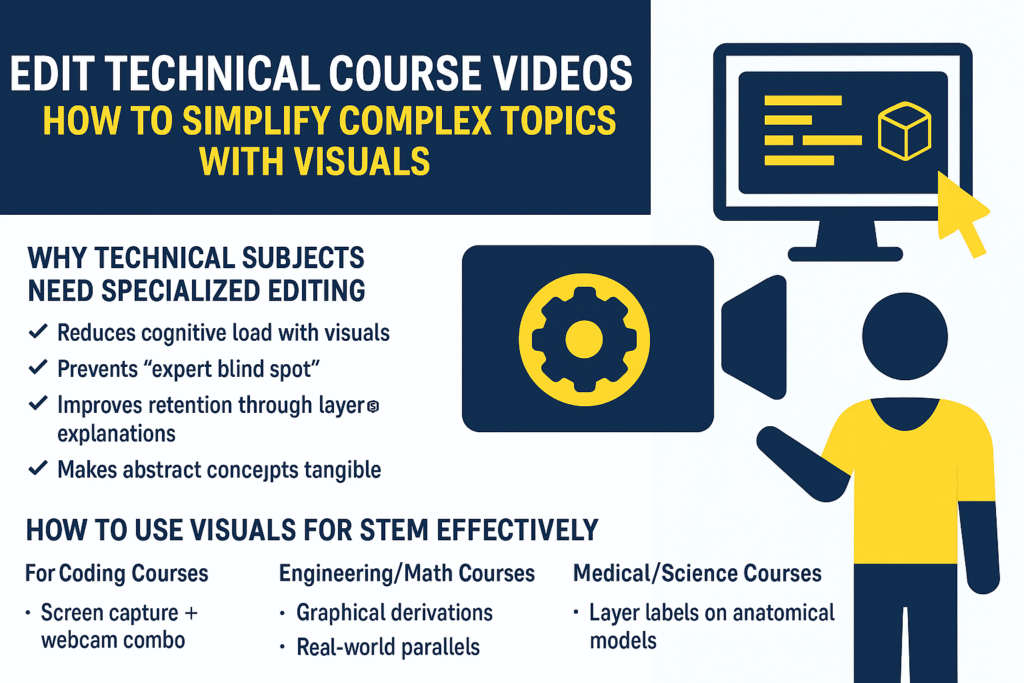
Why Technical Subjects Need Specialized Editing
Because technical subjects demand precision, supportive visuals become essential. As a result, specialized editing reduces cognitive load. In addition, thoughtful edits prevent the “expert blind spot,” where instructors assume prior knowledge. Moreover, layered explanations improve retention, while real-world parallels make abstract ideas tangible.
1) Best Way to Explain Hard Topics Visually
Editing Techniques That Clarify Complexity
When students confront a dense topic, showing everything at once overwhelms them. Therefore, reveal information with step-by-step animated builds. At the same time, zoom in and highlight the exact element you’re discussing. Furthermore, apply consistent color-coding to distinguish parts and stages.
Concept Visualization Tools:
- 3D models to explain spatial relationships
- Flowcharts to simplify multi-step processes
- Comparison sliders to contrast right vs. wrong outcomes
- Animated graphs that surface data trends
🚀 Need complex concepts simplified? Hire a technical video editor
2) How to Use Visuals for STEM Effectively
Technical Subject Best Practices
Coding Courses:
Combine screen capture with a webcam so learners see both the code and your face. Additionally, match syntax highlighting to common IDE themes. For example, demonstrate typical errors and show the fix live to teach debugging.
Engineering & Math Courses:
Graphical derivations help students follow equations. In addition, connect theory to real-world parallels such as bridges or circuits. Multiple representations — equation → graph → physical example — reinforce understanding.
Medical & Science Courses:
Layer labeled overlays on anatomical models. Furthermore, switch between micro and macro views (cellular → organ level) to build context. Finally, break procedures into animated steps so learners retain each phase. Our services
3) Simplifying Complex Ideas in Edits
Simplification isn’t dumbing down; it’s smart structure. For instance, start with a concrete example problem, then transition into the abstract theory. Next, use the rule of three: explain verbally, illustrate visually, and reinforce with analogy. Moreover, add check-in points every 2–3 minutes to re-engage attention. Finally, follow a recursive pattern: preview the concept, deliver the deep dive, then summarize for reinforcement.
4) Technical Video Accessibility
Accessibility keeps every learner on track. Consequently, each technical video should include:
- Accurate closed captions for all technical terms
- Downloadable reference frames for complex diagrams
- An optional slower audio track for dense explanations
- Keyboard navigation for interactive lessons
DIY vs. Professional Technical Editing
Editing technical content yourself is possible; however, it’s time-intensive and tool-limited. In contrast, a professional editor contributes specialized visualization skills, correct technical animations, and studio-quality 3D modeling.
| DIY Approach | Professional Service |
|---|---|
| Full content control | Advanced visualization skills |
| Time-intensive | Accurate technical animation |
| Limited graphic tools | Studio-quality 3D modeling |
💡 For flawless explanations: Get pro STEM video editing
Technical Editing Checklist
Before publishing, review your video with these questions:
- Do visuals match the verbal explanations?
- Are there multiple representations of each concept?
- Is pacing appropriate for the audience level?
- Have you included real-world applications to anchor learning?
Top Tools for Technical Videos
Several tools make technical editing smoother. For example:
- Camtasia – diagram animations
- Blender – 3D modeling
- Manim – mathematical animations
- OBS – multi-source recording
Final Takeaway
Editing isn’t only about polish — it’s about making complex concepts clear, engaging, and accessible. With the right visuals, pacing, and accessibility elements, you can dramatically improve student retention in STEM and other technical courses. About us
👉 Want to make your content crystal clear? Work with technical editing experts Now: Contact us











